Stage queueing and Program feed
Experimental workflow
Stage output requires compatible professional video hardware and an explicitly qualified device, routing, reference, media, and frame-rate configuration. A documented control does not establish shoot readiness.
Stage can turn one Edit timeline into an operator-controlled show. Named base sections become PROGRAM and NEXT, while ProRes 4444 clips with alpha can be fired independently as manual cues. Every accepted GO or FIRE is scheduled on an exact Program cadence tick, including when the AJA transport already has frames queued ahead.
The operating model
- Draft is the editable section and cue plan stored with the composition.
- Program is the immutable snapshot created by Arm Edit Timeline.
- PROGRAM is the base section currently on output.
- NEXT is the following section whose first frame Stage is preparing.
- A Program tick is one exact 24.000 or 30.000 fps output decision. It is independent of the Edit playhead and is shared by base sections and cues.
Edits made after arming stay in Draft. They cannot alter a running Program; stop output and re-arm to publish them.
Fast local operator preview
The Stage operator workspace can preview the Edit timeline without a separate Arm step. With no text field active, press Space to start the local Program preview immediately. Press Space again to pause on the current frame, and press it once more to resume from that frame. This shortcut never starts, pauses, or stops an AJA/SDI output session.
When the show has no authored base sections, the compact transport above the viewport provides two playback scopes:
- Play Timeline runs the composition's effective playback range.
- Current Clip runs the selected clip on the operator playback track.
Use Previous Clip and Next Clip to select adjacent clips, and use the Loop menu to repeat either the timeline or current clip. While a local preview is active, changing its playback scope or moving to another clip restarts it at the new range. The normal Arm/Re-arm workflow below remains the authority for an immutable production Program and physical output.
1. Author the show
- In Edit, set In and Out around the first base section.
- Open Stage and find Stage Program → Draft Base Sections.
- Click Add from Edit In/Out.
-
Name the section, confirm its frame range, choose its exit behavior, and click Apply after changing a row:
-
Loop Until GO repeats until the operator takes NEXT.
-
Play Through advances at the section boundary.
-
Repeat for each section, then use the arrow controls to set their order.
If Edit has no In/Out, Add from Edit In/Out uses the composition's effective playback range.
To add an overlay cue, select an ingested ProRes 4444 or 4444 XQ clip with usable alpha in Edit, then click Add Selected Clip under Manual Alpha Cues. Choose its policies:
- Restart or Ignore While Active for a repeated FIRE.
- Remove or Hold Last Frame when the cue reaches its end.
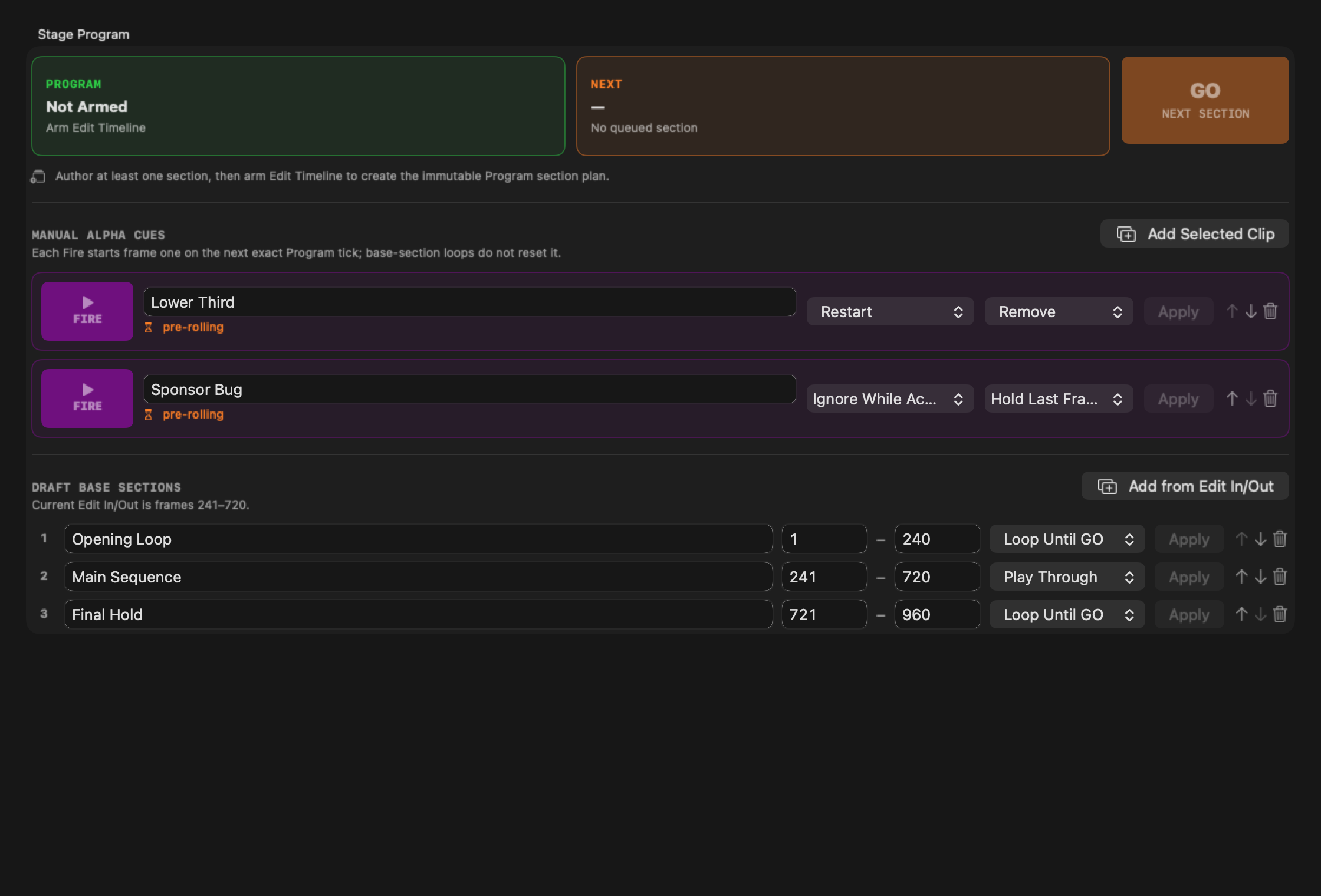
The purple rows are independently clocked alpha cues. They are removed from the looping base snapshot when Program is armed, so a base-section loop does not restart an active cue.
2. Arm the Program feed
- Make sure Stage output is stopped.
- In Plate Playback & Master-Canvas Projection, click Arm Edit Timeline. This also selects Edit Timeline as the master content.
- Wait for Readiness: Ready.
- Confirm the green PROGRAM card and orange NEXT card show the expected names and ranges. NEXT should say ready, not pre-rolling.
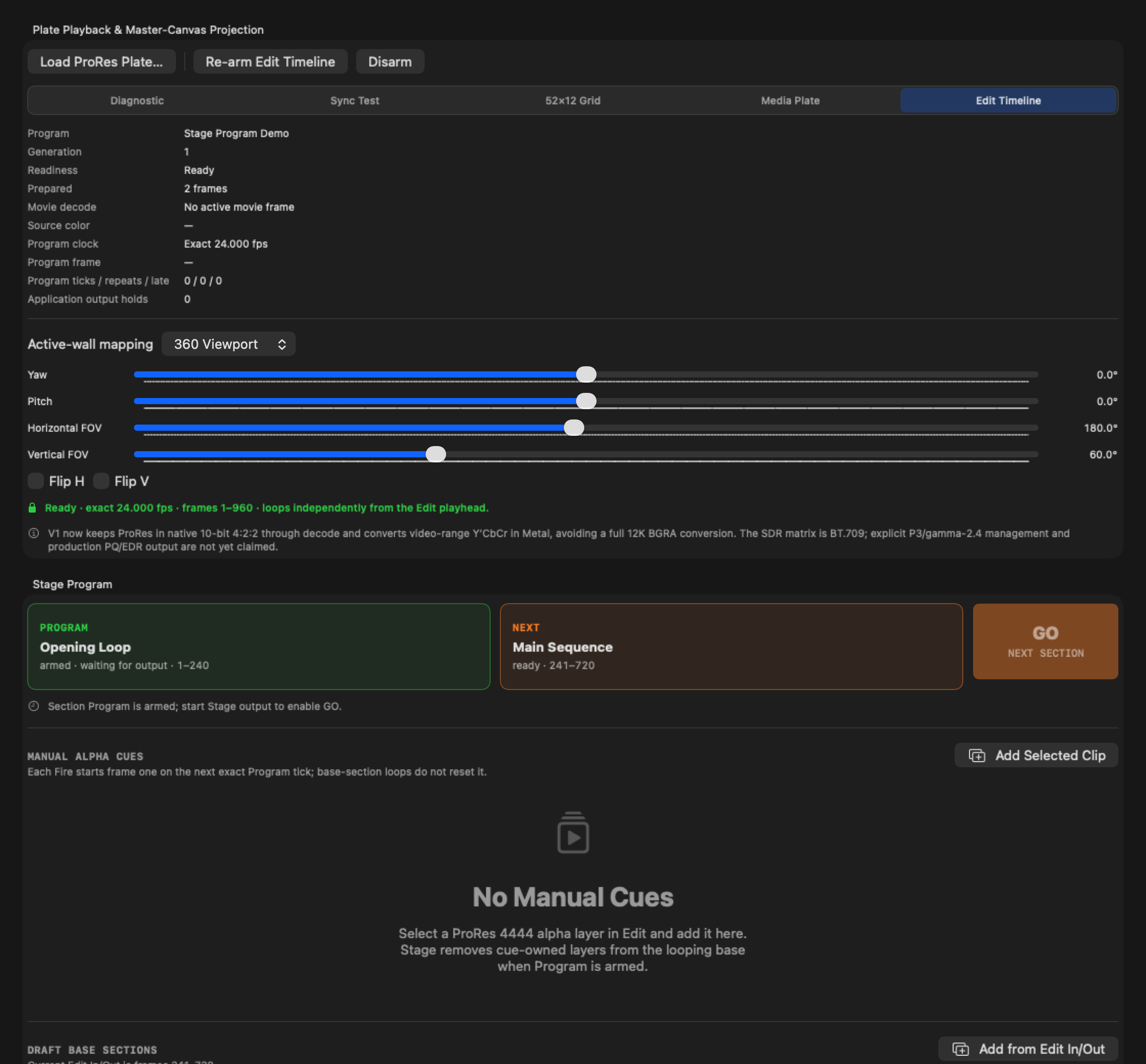
The Program summary is the quickest feed-health check:
| Readout | What it means |
|---|---|
| Generation | The immutable arm revision currently feeding Stage. |
| Readiness / Prepared | Whether qualified frames are resident for startup. |
| Program clock | Exact output cadence; it changes to CLOCKED after output starts. |
| Program frame | The Edit frame currently selected by the Program clock. |
| Program ticks / repeats / late | Window-output timing decisions and misses. |
| Application output holds | Times Stage intentionally repeated the last complete frame. |
If Draft changes after this point, Stage marks the armed generation stale. The existing Program remains unchanged; use Re-arm Edit Timeline before the next run.
3. Start output
Choose and preflight the required route in the Stage sidebar, then use one of the run controls in the header:
- Simulate Here opens the local desktop simulation.
- Run Orei 4K Quad sends one 3840 × 2160 signal containing Canvas A at top-left, B at top-right, C at bottom-left, and a black bottom-right quadrant. This topology was field-tested successfully on the E11 LED stage on August 10, 2026: the mapped 4K transport was split downstream and all used outputs were observed fully in sync. Treat that result as qualification of the tested 4K chain only. An equivalent 8K split-and-map route is a working theory until the complete 8K chain is tested.
- Run One-Head AJA Program starts the compatibility route selected as One Head · Canvas A → SDI 1.
- Run Three-Head AJA Program starts the atomic route selected as Three-Head Program · A/B/C → SDI 1/2/3. SDI 4 is always intentional spare/black; it is not Canvas D.
- Run AJA Diagnostic Mirror sends one mapping-bypassing, frame-identical test raster to SDI 1–4. It is not a Program route.
Choose Program route from the call sheet, not merely from what makes Run available. Three-Head Program requires the 3×1080p24 or 3×1080p30 profile, at least three independent FrameStores, four controllable SDI connectors, and exactly one valid mapping for each of Canvas A, B, and C. Stage checks FrameStore and connector counts independently: four connectors do not prove that three images can be held concurrently. UHD remains available only through One Head. A missing, duplicate, identity-swapped, or invalid A/B/C mapping blocks the whole three-head run; Stage never silently drops or substitutes a head.
The standalone app/render build's native bridge reports the
legacySingleFrame capability, so selecting Three-Head Program produces the
blocking AJA backend supports One-Head Program and Diagnostic Mirror only
preflight issue before KONA acquisition. The complete route is admitted only
when the integrated grouped backend reports independentHDThreeHead for the
selected HD exact-24/exact-30 profile. Hardware-free tests may inject that
capability; it is not proof that the native bridge or attached card supports
the route.
The three-head renderer makes one base/section/cue/hold/blackout decision for each exact Program tick and submits one complete A/B/C bundle. If any head cannot be rendered and packed, none of that tick's heads is a partial success. The transport may repeat the previous complete bundle according to its counted late-frame policy or terminate the run; it may not mix Program ticks or advance heads independently.
When the SDI endurance overlay is enabled for a three-head qualification, the
three image headers read A SDI1, B SDI2, and C SDI3 with the same run
timecode. SDI 4 remains clean legal black with no Program overlay. A missing,
duplicated, or swapped header is a route failure, not a cosmetic issue.
For AJA, set Video I/O buffers and Pre-roll frames before Run. More buffers tolerate longer host stalls but increase startup latency and KONA frame-buffer use. These values are captured when Run begins and cannot be changed during the run.
Do not operate GO or FIRE until the Program summary reports CLOCKED, NEXT is
ready, and the relevant cue says ready · frame one resident.
4. Queue a section transition
Press GO / NEXT SECTION once. Stage schedules NEXT for the first exact Program tick beyond every tick already mapped to output. With AJA, that includes frames already queued in AutoCirculate.
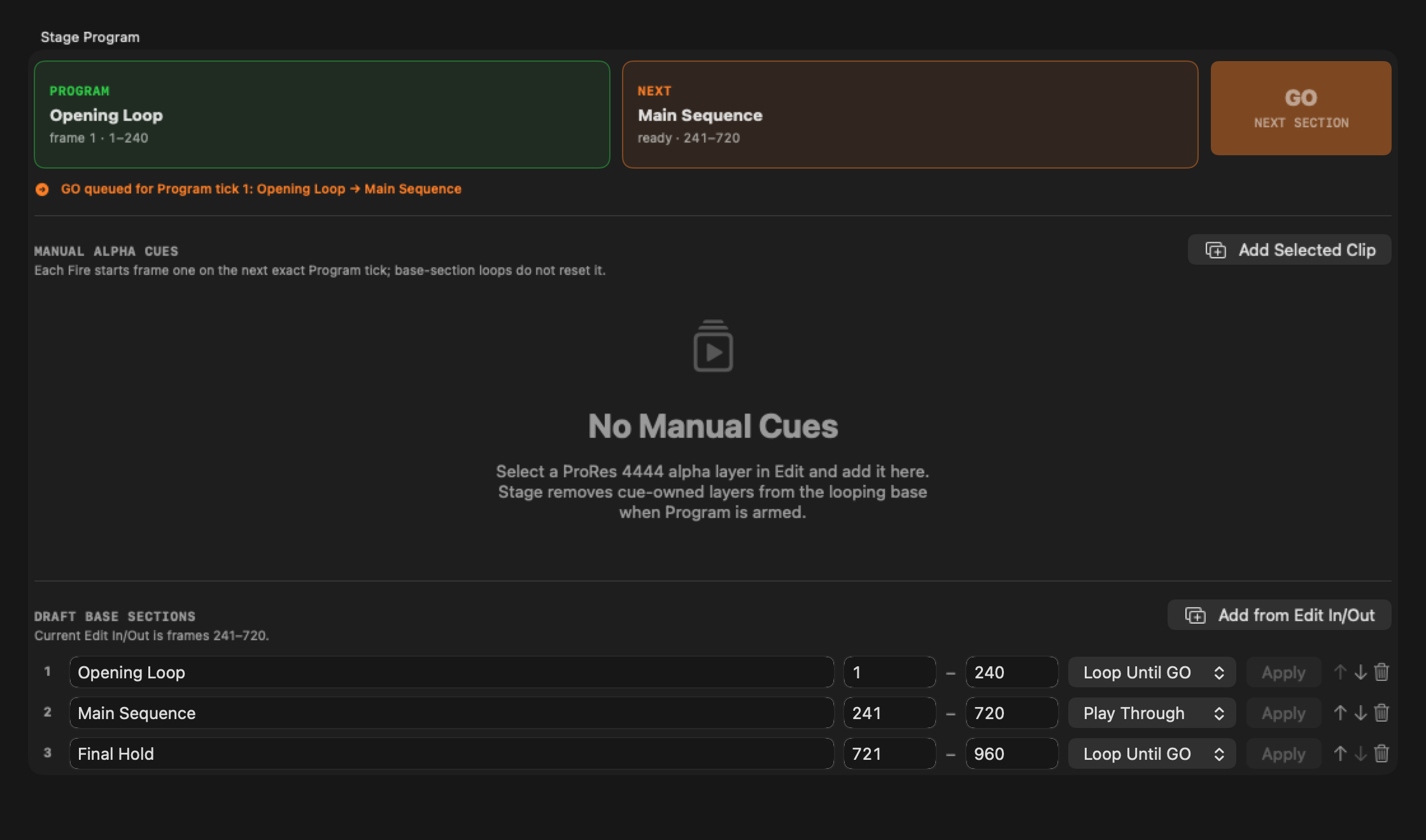
The orange receipt is authoritative: it names the source section, destination section, and effective tick. Until that tick is presented, the PROGRAM and NEXT cards intentionally retain their current names. A short delay on the physical output is normal when the hardware queue is several frames deep; do not press GO again.
At the effective tick, NEXT becomes PROGRAM and the following authored section becomes NEXT. In the final section, NEXT displays a dash.
5. Queue a manual cue
Press the purple FIRE button once. The row changes from
ready · frame one resident to queued for next Program tick, then to
live · frame N when its first frame is presented.
Cue timing is independent of base sections:
- FIRE always starts cue frame one on its accepted Program tick.
- A looping base section does not reset the cue.
- Restart schedules a fresh activation when retriggered.
- Ignore While Active rejects a retrigger until the cue has ended.
- Hold Last Frame keeps the cue's final frame live until a later restart or the Stage run is stopped.
FIRE stays disabled until its qualified first alpha frame is decoded, color-qualified, GPU-complete, and resident.
Monitor an AJA queue
During an AJA run, use the AJA telemetry in the left sidebar together with the Program summary:
| AJA readout | Healthy interpretation |
|---|---|
| Output contract | Names One Head, Atomic 3 Head, or Diagnostic Mirror. For three-head, it must show A→1, B→2, C→3, and 4 black. |
| Program ticks | Advances continuously at the selected cadence. |
| Bundles packed / requested | Three-head only; the values match for a clean complete-bundle run. |
| Packed head frames | Three-head only; equals three times packed bundles. |
| Rejected incomplete bundles | Remains zero. Any nonzero value is a strict fault, even if output repeated safely. |
| Group coherence failures | Remains zero. Any nonzero backend count stops output before the next bundle, is a strict fault, and fails the retained qualification report. |
| Observed topology / FrameStores / SDI | Three-head only; the backend must report Atomic 3 Head, 3 active FrameStores, and 4 configured SDI outputs. Requested routing and card capacity alone do not certify the session. |
| Buffered frames | Remains nonzero after startup. |
| Transfers / Hardware processed | Both rise; processed follows transfers. |
| Hardware tick catch-up | Normally stable; growth means host scheduling fell behind hardware. |
| Expired source ticks | Normally stable; growth means source decisions arrived too late for their hardware tick. |
| Hardware drops | Remains zero. |
| Reference | Shows the chosen Free Run state or a compatible external lock. |
Queue depth changes the delay between clicking an operator control and seeing its scheduled tick on SDI; it does not change the tick on which all Program consumers make the decision. On a three-head run, treat group and per-channel telemetry as one readiness set: a missing channel, mismatched count, partial transfer, nonzero group failure, or output-contract mismatch is a terminal no-go even if another connector appears healthy. For physical sync proof, record every wall/output in one camera view and use the Stage sync diagnostic rather than judging the UI preview.
Stop, revise, and recover
- Click Stop before editing sections, cues, mappings, routing, cadence, or AJA queue settings.
- Click Re-arm Edit Timeline after any Draft or Edit change you want in the next Program generation.
- Use Disarm only when you want to remove the Edit Timeline Program source.
- If GO is disabled, verify output is active, Program is clocked, NEXT exists, and NEXT is ready.
- If FIRE is disabled, verify the cue is in the armed generation and its row reports that frame one is resident.
- If repeats, expired ticks, or drops increase, stop the run, inspect source decode/readiness, then consider additional AJA buffering before restarting.
After an AJA Edit Timeline run reaches a terminal Stop or fault state,
Program Performance retains one session-only Last Run and remains visible
even if the output/content selections change. Use Export Last Run JSON…
before starting another AJA Program run or relaunching the app. Stage protects
unexported evidence from the next run; Clear Last Run deliberately discards
it. Export becomes available only after terminal Stop/release handling, not
while output is active. Schema v3 freezes the selected SDI routing, ordered
Program mapping set, and complete-bundle/head-pack counters alongside the
existing Program and transport evidence, so a later switch between One Head
and Three-Head Program cannot relabel the completed run. It also records
device.frame_store_count and device.sdi_output_count; a three-head report
cannot pass strict assessment below three FrameStores or four SDI outputs.
For that route, it also freezes the backend-observed topology, active
FrameStore count, and configured SDI count; strict assessment requires
threeIndependentHeads, 3, and 4 rather than treating requested routing
or discovery capacity as proof of the live session.
Before a shoot, qualify the exact machine, device, SDI routing, reference, buffering, frame rate, base media, and alpha-cue formats for the full expected run duration. Export and retain the terminal Program Performance evidence. Internal engineering qualification procedures are intentionally not part of this public guide.